Complete Guide to TWTools 2026: Your All-in-One Online Toolkit Tutorial
If you regularly find yourself stuck on small tasks — your boss suddenly needs 10 images compressed under 500 KB, you need to look up an exchange rate on the fly, or you want a professional-looking resume in a hurry — TWTools, a free online toolkit, might be exactly what you’ve been looking for.
After using it for a while, I’ve found it handles plenty of “I only need this once” jobs, and you don’t have to download or install anything. Here’s a walkthrough of TWTools’ main features and the tools that might help you. Information in this article is current as of May 2026.
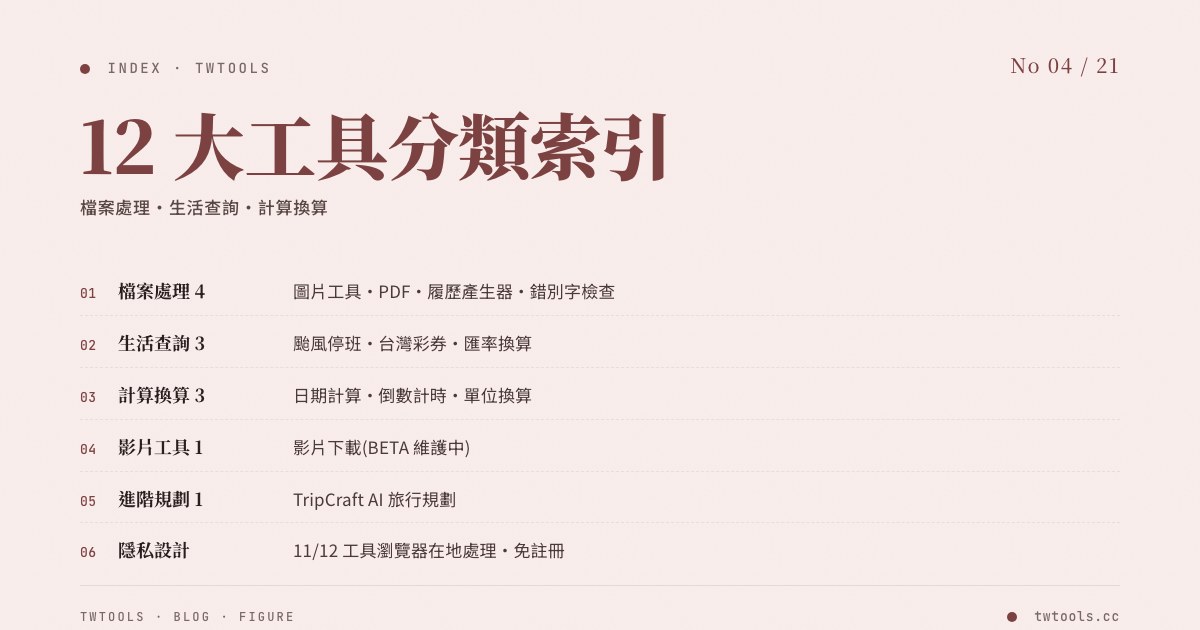
TWTools 12-tool overview
| Category | Tool | What it does |
|---|---|---|
| Image processing | Image compression and format conversion | JPG / PNG / WebP / AVIF conversion + batch processing |
| PDF processing | PDF tool | Merge, split, compress, OCR, sign |
| Lookup | Currency exchange | Real-time rates for 12 major currencies |
| Lookup | Unit conversion | km/mile, kg/lb, °C/°F |
| Lookup | Typhoon day off check | Real-time status for all 22 cities and counties in Taiwan |
| Lookup | Taiwan Lottery | Power Lottery, Lotto results |
| Time | Date calculator | Business day counts, add/subtract days |
| Time | Countdown timer | Holidays, birthdays, anniversaries |
| Work | Resume generator | 3 templates, 8 color schemes, AI polishing |
| Work | Typo checker | AI-assisted Chinese proofreading |
| Travel | TripCraft | AI travel planning |
| Directory | Aire | AI tool ratings and categories |
Most utility tools are browser-based and can be used without an account. For AI-assisted features (such as AI polishing, AI Chinese proofreading, or AI travel planning), your input is processed by a backend service — check each tool’s own privacy notice and processing description before uploading sensitive content.
Image processing: format conversion, compression, and resizing in one place
Start with the most common need. Whether you’re putting together a presentation, writing an article, or uploading images to a website, image handling comes up constantly.
The Image Tool supports two-way conversion across the four most common formats — JPG, PNG, WebP, AVIF — and also handles compression and resizing. The most useful feature is batch processing: upload 10, 20, or more images at once, run them through the same format conversion or compression, and download the whole batch as a single ZIP. No more processing them one at a time.
A real-world scenario: you have a stack of PNG screenshots that need to go onto a platform that only takes JPG. Previously you might have installed Photoshop or GIMP, or hunted down an online converter and processed them one by one. Now you drop the whole pile into the Image Tool, set the output format, and they all convert at once — no per-file clicking required.
⚠️ For iPhone users: the default HEIC format often gets rejected by local Taiwan e-commerce sites, government portals, and LINE OA backends. Use TWTools’ Image Tool to convert to JPG in one click, or change Settings → Camera → Formats → Most Compatible (JPEG) on your phone to solve it permanently.
PDF tools: merge, split, OCR, and sign in one shot
Working with PDFs is just as common. Sometimes you have several PDFs to combine into one for your manager; other times you only need a handful of pages from a 50-page document.
The PDF Tool can:
- Merge: upload 2 or more PDFs and combine them in the order you choose
- Split: pick a page range from a PDF and generate a new file
- Compress: shrink a 25 MB file under 5 MB to clear email attachment limits
- OCR: turn scanned “image PDFs” into searchable, text-selectable PDFs
- Electronic signature: embed a handwritten signature PNG or a digital signature
For example, if you only need to send pages 3–7 of a contract to the legal team, you don’t need to forward the whole thing — split out just those pages and you get a smaller, more focused file. Or if you have three separate PDFs (signature page, NDA, pay stub) that need to ship as one document, the merge function gets it done.
Daily lookups: exchange rates, units, lottery, typhoon days
Next, the “lookup” tools. You might not reach for them every day, but when you need them, they save real time.
Currency exchange
Real-time rates — type in an amount and see the conversion immediately. Supports 12 major currencies (USD, JPY, EUR, KRW, CNY, SGD, MYR, THB, and more). Whether you’re planning a trip, sending an international transfer, checking US stock prices, or comparing before swiping a card abroad, this is much faster than digging through Google.
Unit conversion
Supports km ↔ miles, kg ↔ lb, °C ↔ °F, and more. It’s especially handy when working with foreign recipes or technical documents that mix units. You can also quickly convert between kilowatt-hours, watts, and units when calculating an electricity bill.
Typhoon day off lookup
A uniquely Taiwanese need. During typhoon season, the daily question becomes: is work or school cancelled today? This tool shows real-time status for all 22 cities and counties in Taiwan, so you don’t have to check each local government’s announcement one by one.
Taiwan Lottery
Check the latest results for Power Lottery, Super Lotto, and Daily Cash 539, plus historical winning-number statistics.
Time tools: date calculator and countdown timer
TWTools’ Date Calculator is more useful than it sounds. You can:
- Calculate the number of days between two dates
- Add or subtract days from a date (for example: “Today is May 15 — what’s the date 30 days from now?”)
- Calculate business days (real working days excluding holidays)
Common scenarios: “How many days until the contract delivery deadline?” “What’s the end date of my new employee’s probation?” “When does this project milestone land?” Manual calculations are error-prone — type in the values and the answer is right there.
The Countdown Timer supports preset events (New Year, birthdays, anniversaries) and custom dates too. Things like “15 days until the trip” or “X days until the 2026 Lunar New Year break.” Browser notifications keep you from missing important moments.
Work essentials: resume generator and typo checker
If you’re job-hunting or helping a friend look over their resume, these two tools come in handy.
Resume generator
Comes with 3 templates and 8 color schemes so you can put together a professional-looking resume fast. A bonus: it has a built-in AI polishing feature — paste in your work experience and accomplishments, and the AI rewrites them into more compelling phrasing. It can also draft a personal statement, saving you from staring at a blank page. Once you’re done, export straight to PDF — clean layout and ATS-friendly by design.
⚠️ Many large employers now use some form of applicant tracking system (ATS) or resume-screening workflow. TWTools’ resume tool follows ATS-friendly conventions (single column, standard fonts, no image-only layouts).
Typo checker
Uses AI to proofread Chinese and catch common errors like:
- Confusing homophones (e.g. xiang-guan “related” written as the wrong character pair “want-to-close”)
- Near-synonym mix-ups (e.g. “appropriate” written as “appropriate amount”)
- Misuse of ji-shi “real-time” versus “in time”
- Inconsistent full-width and half-width punctuation
When you’re writing a resume, report, or email, a single typo can undercut the entire document’s credibility. Paste in the text and you get suggested fixes instantly.
AI travel planning: TripCraft turns one sentence into a full itinerary
Last, an interesting one: TripCraft. Tell it something like “I want to go to Kyoto, Japan for 5 days with an NT$30,000 budget,” and the AI plans the itinerary for you based on season, budget, and trip length — recommendations for places to visit, restaurants, transportation, and budget allocation.
You don’t have to dig through travel sites or Google Maps yourself; the system hands you a complete itinerary. It’s a starting reference — adjust it based on your own preferences. Auto-detects 30+ currencies, so it can run the foreign-exchange numbers for you before you leave.
For anyone who doesn’t have time to plan a trip or doesn’t know where to start, this tool gets you off zero quickly.
Aire AI tool directory: monthly-updated AI tool ratings
Beyond the practical tools, TWTools also runs Aire (aire.twtools.cc) — a directory focused on rating and categorizing AI tools, with monthly automated audits of tool status (price changes, shutdowns, rebrands). Useful for questions like:
- Which AI image tools are the most current and worth using?
- ChatGPT vs Claude vs Gemini — how should you choose?
- Which AI tools have free tiers, and what are the limits?
Head to Aire for deeper reviews. Status is refreshed automatically on the 1st of every month, so you don’t see outdated info.
Knowledge articles: learn while you use the tools
Beyond the tools themselves, TWTools has a Knowledge Articles section with practical tutorials:
- Image compression tips and JPEG vs WebP vs AVIF comparisons
- Currency exchange knowledge and how the 1.5% overseas card fee works
- Tax filing guides, education deductions, long-term care special deductions
- Emergency fund calculations and Labor Pension voluntary contribution strategies
- Resume writing, ATS screening, and AI tool usage
Skim through them when you have time and pick up something new. Every article is current to 2026 and pairs naturally with the corresponding tools.
FAQ
Q1: Are these tools really free? Any usage limits?
A: Completely free, no login required, no paywalls. AI features (resume polishing, typo checking, TripCraft) have daily usage caps, but the limits are more than enough for everyday use.
Q2: Do uploaded files get stored? Is it private?
A: Most tools (image processing, PDF operations, unit conversion, etc.) run entirely in your browser — files never leave your device. Only AI features send text through an encrypted connection for processing, and the text is discarded after processing rather than retained. See the site’s privacy policy for full details.
Q3: Does it work on mobile?
A: Yes. TWTools is responsive — open it in a mobile browser and it just works. Some tools (like the resume editor) are more comfortable on a larger screen, but the core functions all work fine on a phone.
Q4: Is there an API?
A: Not publicly. If you have a business integration use case (for example, embedding the currency lookup into your own system), contact the TWTools team to discuss licensing.
Q5: Will the tools keep getting updated?
A: Yes. We fix bugs and add features every month based on user feedback. Major updates are announced in the Knowledge Articles section. For example, 2026 added AVIF image format support, Chinese PDF OCR recognition, and 30+ currency auto-detection in TripCraft.
Q6: Can I suggest a new tool? Is there a submission channel?
A: Yes. Click “Contact Us” on the TWTools home page to file a request, or recommend a tool you use through Aire’s submission page. User suggestions get factored into the next development cycle’s priorities.
Wrap-up
TWTools’ core advantage is being one-stop. What used to take 5 different websites now takes one URL. No software to install, no subscription, no version-compatibility worries — just open a browser and use it.
Whether you’re a student, an office worker, or a freelancer, there’s almost always something here that will save you time. Bookmark TWTools — next time you need to handle a PDF, check an exchange rate, or build a resume, you’ll know exactly where to go.