2026 Image Compression Guide: JPEG, PNG, WebP, AVIF & HEIC Formats Compared
In the internet era, images are everywhere — social media posts, product listings, resume layouts, website visuals. The problem that always tags along: files get too big, uploads drag, storage costs money, and pages slow down. How do you keep the visual quality you want and still keep file sizes small? The 2026 answer is a three-part formula — pick the right format, use the right tool, set the right resolution.
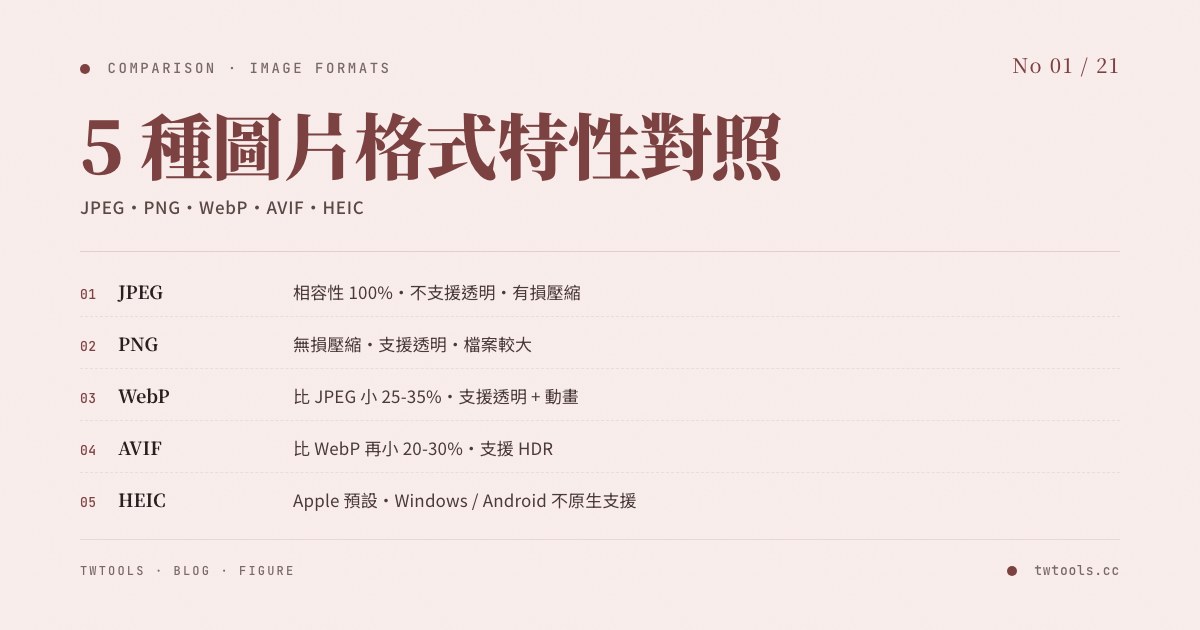
Five mainstream image formats compared (2026 update)
In 2026, the five image formats you’ll run into online are JPEG, PNG, WebP, AVIF, and HEIC. Each has its own use case.
JPEG (most widely compatible)
JPEG (Joint Photographic Experts Group) uses lossy compression. It’s been around since 1992 and remains the “lowest common denominator” format.
- Pros: Smallest file size for photos; accurate color reproduction with 16 million colors; 100% supported across devices, platforms, and software
- Cons: No transparent background (no alpha channel); blocky distortion (compression artifacts) shows up when quality drops too low
- Best for: Portraits, landscape shots, product photos, blog illustrations, social media uploads
PNG (transparent + lossless)
PNG (Portable Network Graphics) uses lossless compression — no color information is dropped.
- Pros: Full transparency (alpha channel) plus semi-transparency, ideal for design files, icons, and screenshots; lossless color, maximum quality
- Cons: Files are larger. For photos with complex color, PNG can run 3–5× the size of JPEG
- Best for: Logos, icons, buttons, screenshots, any design asset that needs a transparent background
WebP (the modern web workhorse)
WebP was developed by Google and launched in 2010. In 2026 it’s still the most common next-generation format on the web.
- Pros: At the same quality, files are 25–35% smaller than JPEG and 26–34% smaller than PNG; supports transparency and animation (can replace GIF); roughly 97% global browser support
- Cons: Some older software and systems still don’t accept WebP (Word 2019, some legacy features on older social platforms)
- Best for: Web optimization, modern web apps, any situation where you need maximum compression
AVIF (the 2026 new mainstream)
AVIF (AV1 Image File Format) was released in 2019 by the Alliance for Open Media, built on the AV1 video codec.
- Pros: Another 20–30% smaller than WebP at the same quality; supports HDR and wide color gamut (WCG); the only format that fully delivers next-gen display color accuracy
- Cons: Global browser support is 93% (Safari 16.4+ finally added it in 2023), but encoding is slower than WebP, and older IE / Chrome below version 85 don’t support it
- Best for: Photography sites that care about HDR and wide color, streaming platforms, brand sites where color accuracy matters
HEIC / HEIF (iPhone default)
HEIC (High Efficiency Image Coding) has been Apple’s default format since iOS 11 in 2017.
- Pros: Files are 50% smaller than JPEG; supports transparency; supports Live Photo motion
- Cons: Windows, Android, Chrome, and Firefox don’t support it natively — you have to convert it before using it outside the Apple ecosystem; licensing fees keep most website platforms from adopting it
- Best for: Transfers inside the Apple ecosystem (iPhone → Mac, iPhone → iPhone); not suitable for uploading to websites or sharing with Windows / Android users
- ⚠️ A common trap: iPhone users uploading photos to local Taiwan e-commerce sites, government portals, or LINE OA backends often get rejected because HEIC isn’t accepted. Go to Settings → Camera → Formats → Most Compatible (JPEG) to avoid this
When to use which format?
| Image type | Recommended format | Why |
|---|---|---|
| Portraits, scenery, product shots (social upload) | JPEG | 100% platform compatibility |
| Logos, icons, buttons (needs transparency) | PNG or WebP | Transparency + sharp edges |
| Website hero (no transparency) | AVIF + WebP fallback | Smallest files + broad compatibility |
| Website hero (needs transparency) | WebP (primary) + PNG (fallback) | Transparency and compression together |
| Screenshots, UI mockups | PNG | Lossless, keeps detail sharp |
| Social media sharing | JPEG | Most universally compatible |
| Email attachments | JPEG | Most universally compatible, small files |
| iPhone photo backup | HEIC (inside Apple) or JPEG (cross-platform) | Depends on your purpose |
Picture element fallback strategy (web development)
<picture>
  <source srcset="hero.avif" type="image/avif">
  <source srcset="hero.webp" type="image/webp">
  <img src="hero.jpg" alt="Hero image" loading="lazy">
</picture>
This pattern lets the browser pick the best format it supports: the newest browsers get AVIF, older ones fall back to WebP, and the rest fall back to JPEG. This is the standard approach for mainstream 2026 websites.
How to choose compression quality
Compression quality is a 0–100 setting. The higher the number, the better the image and the larger the file. The trick is finding the balance between quality and size.
JPEG quality settings
- 80–85: the sweet spot. Almost no visible distortion, and file size drops to roughly 10–20% of the original. Recommended for most situations
- 90+: print-grade. Files get noticeably bigger. Overkill unless you have a high-end commercial use case
- 60–75: fast-loading web images. Compression artifacts start to show, but it’s fine for most web purposes
- Below 60: not recommended. Distortion becomes obvious, especially blocky artifacts on faces
PNG is lossless by design
PNG uses the deflate lossless algorithm and has no “quality” parameter. File size depends on dimensions and color complexity. You can shave size by adjusting color depth (8-bit 256 colors vs 24-bit 16 million colors).
WebP quality settings
WebP behaves similarly to JPEG: 75–80 is the recommended setting; 85+ gives high quality but files start to approach the original size.
AVIF quality settings
AVIF holds up especially well at low quality settings. 60–65 can match the visual quality of JPEG 80–85 while producing a smaller file. Photography-heavy sites can confidently test 50–60.
Resolution vs file size
The other key lever in image optimization is resolution. People often overlook it, but it usually matters more than the quality setting.
Recommended resolutions for common 2026 scenarios
- Website hero image: 1,920 px wide is plenty; even on 4K displays you rarely need more than 2,560 px
- Social media OG image: 1,200 × 630 px (the size Facebook, X, and LINE all use)
- Avatar or icon: 400 × 400 px or 500 × 500 px
- Thumbnail: 300 × 300 px is enough
- High-resolution displays (2× / Retina): use
srcsetor thepictureelement to serve different sizes by device pixel ratio — don’t send 2× images to every visitor - Story / Reels: 1,080 × 1,920 px (9:16 vertical)
Golden rule: resize the image for its actual use first, then compress. In most cases, smaller dimensions help more than tweaking quality.
2026 social platform image specs
| Platform | Post image | OG / share image | Story / Reels | Profile image |
|---|---|---|---|---|
| 1,200 × 630 | 1,200 × 630 | 1,080 × 1,920 | 170 × 170 | |
| Instagram (square) | 1,080 × 1,080 | 1,200 × 630 | 1,080 × 1,920 | 320 × 320 |
| Instagram (portrait) | 1,080 × 1,350 | — | — | — |
| X (Twitter) | 1,200 × 675 | 1,200 × 675 | — | 400 × 400 |
| LINE post | 1,200 × 1,200 | — | — | 240 × 240 |
| Threads | 1,080 × 1,080 | 1,200 × 630 | — | 320 × 320 |
| 1,200 × 627 | 1,200 × 627 | — | 400 × 400 |
⚠️ Every platform recompresses images after you upload them (lowering quality a bit). Compressing to quality 80–85 yourself before uploading keeps the platform’s final output acceptable.
Practical compression workflow
- Identify the use case → pick the right format (social = JPEG; website = AVIF + WebP fallback; screenshot = PNG)
- Adjust the resolution → scale it for the actual display context (the most important step)
- Choose the compression quality → JPEG 80–85; WebP 75–80; AVIF 60–65
- Run it through a tool → TWTools’ Image Compression supports conversion across all five formats
- Process in batches → drag and drop multiple images and process 20+ at once
Recommended online compression tool
TWTools’ Image Compression is built for exactly this workflow:
- Supports conversion between JPEG, PNG, WebP, and AVIF, plus one-click HEIC → JPEG conversion
- Local processing: every image stays in your browser; nothing is uploaded to a server, so privacy is fully protected
- Live preview: see the before-and-after comparison so quality loss is obvious at a glance
- Batch processing: drag and drop multiple images and compress them all at once
- No installation needed: open the browser and use it directly; nothing takes up space on your computer
Real-world test: one 4K landscape photo
Using a 3,840 × 2,160 landscape photo (original JPEG 8.2 MB) as the baseline, here’s what different format/quality combinations actually produce:
| Format | Quality | File size | Visual quality (by eye) | Best for |
|---|---|---|---|---|
| JPEG | 100 | 9.6 MB | Truly lossless (larger than original) | |
| JPEG | 85 | 1.3 MB | No visible difference | Web standard |
| JPEG | 70 | 720 KB | Visible if you look closely | Thumbnails |
| WebP | 80 | 950 KB | No visible difference | Website galleries |
| WebP | 65 | 580 KB | Close to JPEG 80 | Mobile-first |
| AVIF | 60 | 420 KB | No visible difference | Recommended 2026 mainstream |
| AVIF | 45 | 280 KB | Visible if you look closely | Aggressive mobile optimization |
| PNG-24 | (lossless) | 11.4 MB | Truly lossless | Not suitable for photos |
⚠️ Bottom line: AVIF 60 matches the visual quality of JPEG 85 while cutting file size by two thirds. If 95% of your visitors are on current Chrome, Safari, Edge, or Firefox, AVIF + JPEG fallback is the 2026 best practice.
Common image optimization mistakes
These traps tend to undermine even careful optimization work:
- Uploading raw camera files directly to a website: camera originals are often 24–50 MB. Uploading them untouched burns visitor bandwidth — mobile users may stare at a blank page for 5 seconds or more
- Over-compressing important images: pushing a client logo or product shot down to quality 50 leaves it visibly blurry. Quality 85 plus a smaller resolution is almost always better
- Saving everything as PNG: dumping photos (landscapes, portraits) into PNG balloons the file with no visual benefit — only use PNG when you actually need transparency or you’re saving a screenshot or UI asset
- Recompressing the same JPEG: compress the same JPEG three times and quality drops faster than you’d think (each pass adds new artifacts). Always work from the original source, never on a previously compressed file
- iPhone uploads failing on Taiwan backends: HEIC by default gets rejected by local e-commerce, government sites, and LINE OA backends. Switch to Most Compatible (JPEG) to head this off
How image formats affect SEO
Since 2024, Google PageSpeed Insights has strongly recommended AVIF and WebP for improving LCP (Largest Contentful Paint) — one of the three Core Web Vitals metrics that directly affects search rankings. Real-world numbers:
- Switching a site fully from JPEG to AVIF typically improves LCP by an average of 30–40%
- Mobile users (with slower connections) see the biggest experience gain from smaller files
- E-commerce sites (lots of product images) benefit most from format optimization — conversion rate can move by 5–10%
For everyday work, blogs, e-commerce, social media, and website design, image compression is a core skill. Once you understand the five formats and have the right tool, you can solve almost every image optimization problem: faster page loads, lower storage costs, snappier social uploads, and stronger SEO. Those are all long-term gains you can actually measure.